ParseError: syntax error, unexpected 'fn' (T_STRING), expecting :: (T_PAAMAYIM_NEKUDOTAYIM)
More info is available in the error log.
Table of Contents
Welcome New Users!
Thanks for volunteering to edit this site.
I am planning on setting up the main tree structure for all of the pages myself and then leaving a bunch of blank pages there for easy editing. If you have something you to add to a page just go ahead and edit it.
If you're not sure that information on a page is accurate you are able to make comments on any page through the discussion area at the bottom of the page. Only logged in users can see the discussion.
Editing Pages
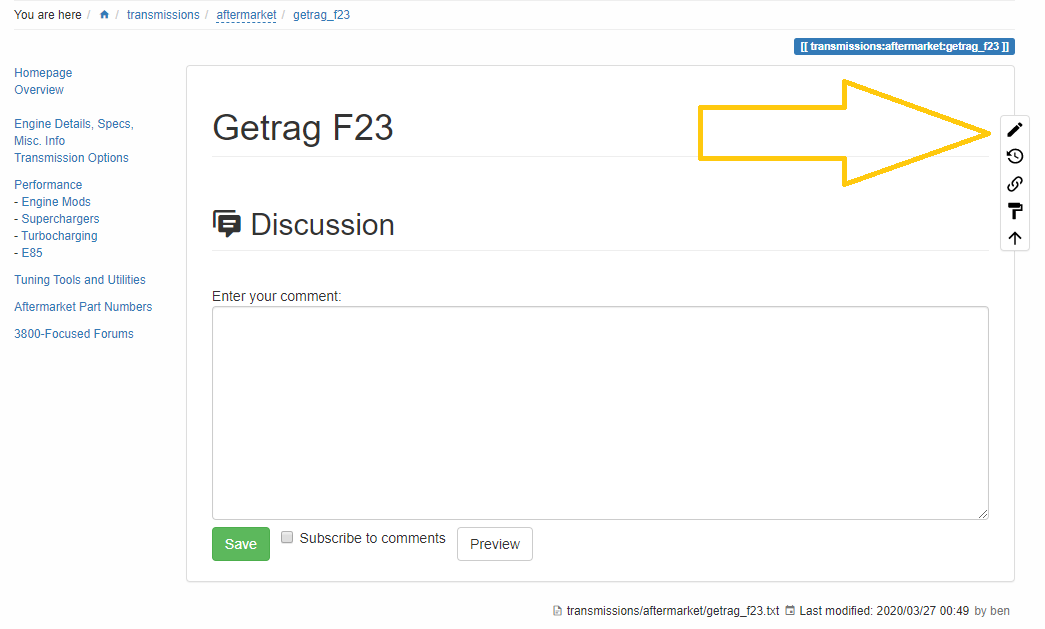
To edit a page, go ahead and navigate to the page you want to edit. On the right hand side you will see a little tooltip deal with 5 little buttons. The top one is the edit button.
I'm using a WYSIWG editor to help make page edits easier.
You can revert it back to the default dokuwiki editor if that's easier or if you're having trouble getting the spacing correct by hitting the “DW Edit” button below the editor field.
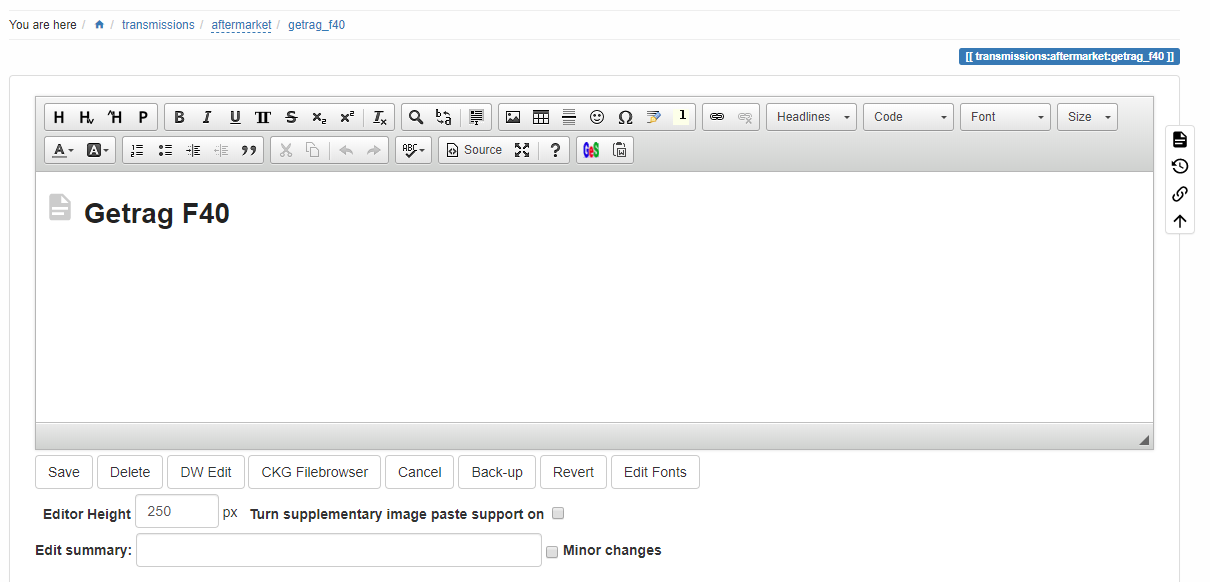
You can also resize the editor to make it easier to read it. Just use the little triangle in the bottom right hand corner.
Adding Media
Images
I would like to have every image referenced anywhere to be hosted on this server. I don't want to rely on photobucket or imgur because they haven't been reliable in the past. This way if anyone takes down their photos there are copies on this server as well.
I have 30GB of storage available to this server right now so there is tons of space here. Don't worry about space concerns right now, I can easily add more storage if needed. Worst case scenario I just start hosting more media on my own local servers and I have a ton of storage space available locally.
To add pictures to the site you have a few options. The easiest option is just to copy the image into the editor with “ctrl+v”. If you're using chrome you'll need to hit the checkbox beneath the editor for “turn supplementary image paste support on” first though.
Once you have pasted the image you should see it within the editor. You can then right-click on it to edit the size it's displayed as or the place where it is located.
The second way is to manually upload images or add images that are already uploaded. There is a little image icon within the editor that you can use to add the images:

That will open up a page that looks like this. From there you can browse the server for existing images and select them, or upload them manually.

Videos
I have added a plugin that lets you embed videos from other sites onto wiki pages. You can throw youtube videos on here or probably any other site too.
I'm not as concerned about hosting videos on this server. Images are a lot smaller and easier to deal with, but I don't really have space for videos right now. They can get pretty large.
To add a video you'll have to throw a bit of code down right now.

The video ID is what you place after the “youtube>” piece. You can find that in the URL of the browser when you're looking at a youtube video

To use other sites you might need to reference the bottom of this page: https://www.dokuwiki.org/plugin:vshare
Here's an example of what it might look like though:
mfkU0HO5U1k
General Website Information
This website uses Dokuwiki as its wiki platform to help make this easier to use and edit. https://www.dokuwiki.org/
If there are things you would like to see changed on the website then let me know and I can see what I can do.
If you're looking for more information about what's possible on the site with dokuwiki and the way formatting is done or themes are created, the dokuwiki website will have more information. I can always edit the code though to change little things here and there too.
It is currently hosted in AWS on a “free-tier” EC2 instance. It doesn't have a ton of system resources, but it has 30gb of disk space. The free-tier will only last for 12 months. After that AWS wants something like $90/year to keep the same server going. At that point I will probably just host things locally on one of my spare computers and throw a ton of disk space at it.
I'm monitoring this website with my work's software. It's basically google analytics on super steroids.
If you want to see some data around site traffic this page has a quick dashboard you can view without signing in. https://zkp73151.sprint.dynatracelabs.com/dashboards/a2e7b963-3151-4d40-b03b-aeefc560a313?auth=PxNNs9wfT06grgl_mgf4w